
Canadian Take-Home Pay Calculator: how it works
The Canadian Take-Home Pay Calculator, at tax.chowchowlabs.ca, shows what you keep from your salary after income tax, CPP or QPP and EI, for every province and territory, using 2026 rates. This page explains what it calculates, how we keep it accurate, and where its limits are.
What it calculates
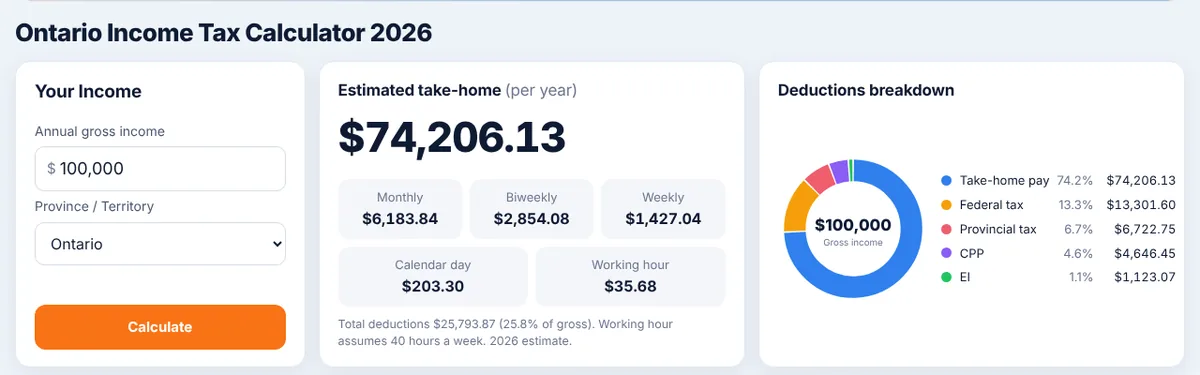
Enter a salary and a province, and you get your federal income tax, provincial income tax, pension contributions (CPP, or QPP in Quebec), EI premiums, and your take-home pay per year, month and paycheque. You also see your marginal rate, the rate on your next dollar, and your average rate, the share of your whole income that goes to tax. The calculation runs in your browser.
Around the main calculator, the site has a page for each province and territory, a side-by-side comparison of all of them, and an hourly-to-salary converter.
How we keep it accurate
The rules come from published sources: CRA’s federal brackets, credits and payroll maximums, and each province’s own budget and tax tables. Each figure records when we last checked it. Our methodology page walks through a full $100,000 Ontario example, step by step, from gross salary to take-home pay.
Before every release, the calculator runs a set of test cases whose expected answers were worked out by hand from the published rates, not copied from the calculator itself. The methodology page shows the results of those checks live.
What it doesn’t include
A take-home estimate is only as useful as you know its limits. The calculator covers employment income with the basic credits everyone gets. It leaves out:
- Refundable credits and benefits, such as the GST/HST credit, the Canada Workers Benefit and child benefits
- Credits for medical expenses, donations, tuition, childcare, disability, age, a spouse or dependants
- Union dues, workplace pension plans and other payroll deductions
- Alternative minimum tax, foreign income and part-year residence
Why your payslip may not match
People often compare the result with their pay stub and find a small gap. Usually it’s one of three things. Payroll withholds per pay period using CRA’s tables, which isn’t the same as the tax you owe for the year. Your employer may deduct things we don’t, such as a pension plan or benefits. And when a province changes a rate partway through a year, payroll uses a temporary rate for the rest of that year, while we use the annual value that applies on your tax return. For example, Newfoundland and Labrador’s basic personal amount changes mid-2026, so payroll and the return use different numbers.
Free and Pro
The salary calculator, province pages, comparison and hourly converter are free, with no account. An optional Pro plan ($2.99 CAD a month) adds other income types and the deductions that change your tax: bonuses and commission, interest, rental and pension income, eligible and non-eligible dividends, capital gains, self-employment income, and RRSP and FHSA contributions, and removes ads. For example, someone earning $100,000 in Ontario can see what a $10,000 bonus actually adds to their take-home pay, or how much a $5,000 RRSP contribution lowers their tax.
Learn more
Our guide on how Canadian tax brackets work in 2026 explains marginal and average rates with a worked example, and why a raise never lowers your take-home pay.
Try it
Open the Canadian Take-Home Pay Calculator or get the iPhone app.
Sources
- Canada Revenue Agency, Canadian income tax rates for individuals
- Canada Revenue Agency, CPP contribution rates, maximums and exemptions
- Employment and Social Development Canada and Revenu Québec, EI, QPP and QPIP rates for 2026
- Each province’s and territory’s 2026 budget and tax tables
The calculator gives estimates for planning. It isn’t tax advice, and your actual tax depends on your full return. For your own situation, check CRA My Account or talk to a tax professional.